Business Systems
Best Business Automation Checklist Tools: Comparison 2026
Compare top business automation checklist tools for small teams. See side-by-side tradeoffs, AI integration tips, and final recommendation by use case. Save hours weekly.
Quick Take
Built for founders, operators, and lean teams who want practical guidance instead of vague advice.
Why You Need a Business Automation Checklist That Talks to Your AI
Most small teams have two things: a growing list of repeatable tasks and at least one AI tool generating content, scoring leads, or handling customer replies. The problem is that these two systems rarely talk to each other directly. You end up copying AI outputs into a task manager, sending manual reminders, and chasing approvals. That is where a business automation checklist tool comes in. For a broader overview of integrating AI into daily operations, see our guide to small business marketing AI.
A business automation checklist, in the context of marketing AI, is a sequence of steps triggered by AI outputs. For example, when your AI drafts a blog post, the checklist automatically notifies an editor, schedules a review, and publishes the post on a set date. The tool does not just list what to do—it moves work forward based on inputs from your AI stack.
This comparison evaluates three approaches to building that kind of system. We look at the tradeoffs in flexibility, integration depth, learning curve, and team fit. The goal is to help you pick the tool that reduces manual handoffs without requiring a dedicated engineer to maintain it.
Our Evaluation Criteria for the Comparison
To compare business automation checklist tools fairly, we use five criteria that matter most to small marketing teams. These criteria reflect the reality that your checklist tool must fit into an existing workflow with marketing AI, not replace it.
Integration with Marketing AI
Some tools offer native connectors to popular AI platforms, while others rely on API-based middleware. Native integration reduces setup time and avoids extra subscription costs. API-based integration, on the other hand, gives you more control over exactly how data flows between systems. The right choice depends on whether you prioritise speed of deployment or customisation depth.
Checklist Creation and Editing Ease
Not every team member writes code. A drag-and-drop interface lets marketers build and adjust checklist sequences without developer support. But some tools trade visual simplicity for limited logic options. If your workflows require conditional branching—send this task only if the AI scores a lead above a certain threshold—a code-based or hybrid approach may be necessary.
Recurring Triggers and Conditional Logic
A checklist that runs the same way every time is useful for routine tasks like weekly content publishing. But many real workflows need conditional logic: if the AI draft is approved, send to design; if rejected, notify the writer. Tools vary widely in how they handle these forks. Some support complex conditions natively, while others limit you to linear sequences.
Collaboration Features
Automation checklists rarely involve only one person. Team roles, approval steps, and notification rules determine whether the tool helps or hinders collaboration. Look for features like role-based access, comment threads on specific tasks, and the ability to reassign steps mid-workflow. Without these, your checklist can become a bottleneck rather than a time-saver.
Pricing and Scalability for Small Teams
Small teams need predictable costs that grow with usage, not jump after a low-tier intro. Some tools charge per active checklist or per task execution, which can scale quickly if you automate many sequences. Others offer flat-rate plans that are easier to budget. The right pricing model depends on how many checklists you run and how often they trigger.
Side-by-Side Tradeoffs: Top 3 Tools Compared
The three tools below represent different philosophies for building a business automation checklist. Each has clear strengths and honest limitations. Your choice depends on which tradeoff your team can live with.
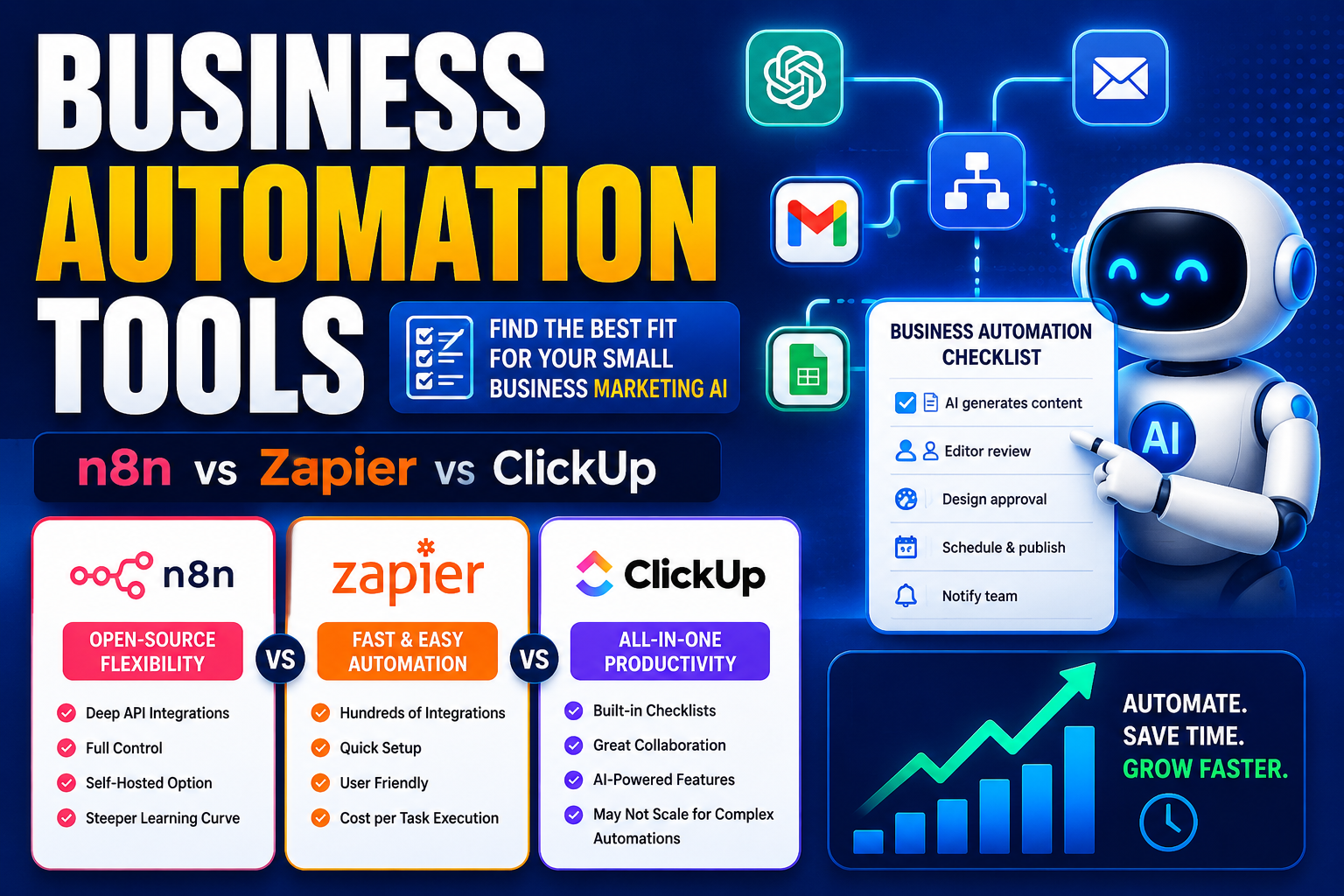
Tool A: n8n – Open-Source Flexibility vs. Steeper Learning Curve
n8n is an open-source workflow automation platform that gives you granular control over every step of a checklist sequence. You can connect it to almost any AI tool via API, build custom logic nodes, and host it on your own infrastructure. For teams with internal technical skills, this approach is powerful.
- Strengths: Deep integration with marketing AI through custom API calls; supports conditional branching and complex triggers; no per-task pricing if self-hosted; full control over data flow.
- Limitations: Requires comfort with JSON and API configuration; no native drag-and-drop checklist builder (though the visual workflow editor helps); maintenance and updates fall on your team; limited built-in collaboration features like approval roles.
- Best suited for: Teams with at least one technical operator who can set up and maintain automations. Founders who prefer self-hosted solutions and want to avoid monthly per-task fees.
Tool B: Zapier + Checklist Add-on – Simplicity vs. Monthly Cost per Task
Zapier connects hundreds of apps with pre-built integrations, and its ecosystem includes checklist-focused add-ons and dedicated automation templates. For teams that want to get a business automation checklist running in minutes, this is the most accessible route.
- Strengths: Fast setup with visual editors; broad library of connectors to marketing AI tools; easy to share and modify checklists with non-technical team members; good notification and alert options.
- Limitations: Each task execution counts toward your monthly quota, which can become expensive when you run multiple checklists daily; conditional branching is limited in basic plans; complex multi-step workflows require careful mapping; checklist-specific add-ons may introduce extra latency.
- Best suited for: Marketers and operators who need a quick implementation and are willing to pay a premium for speed. Teams running low-to-medium volumes of automated checklists where cost per task stays within budget.
Tool C: ClickUp Automations – All-in-One Workspace vs. Limited AI-Native Triggers
ClickUp is a project management platform that includes built-in automation rules for checklists, task dependencies, and recurring sequences. For teams that already use ClickUp as their central workspace, adding automation checklists in the same tool eliminates the need for integration middleware.
- Strengths: Checklists live inside your existing task and project structure; no extra tool to learn; native approval workflows and role-based permissions; good for client onboarding and recurring publishing sequences.
- Limitations: Integration with third-party AI tools often requires Zapier or native API work, reducing the all-in-one benefit; automation triggers are primarily event-based within ClickUp (task status changes, due dates) rather than AI output-driven; checklist logic can feel rigid for complex conditional workflows.
- Best suited for: Teams that already rely on ClickUp for project management and want to layer automation on top without adding another subscription. Operations that follow predictable, linear sequences rather than highly conditional flows.
Best-Fit Guidance by Use Case
The right tool depends on the specific workflow you want to automate. Here is how each approach performs across three common small-team scenarios.
Best for Marketing Sequences (Email + Social AI Prompts)
If your goal is to automate a sequence where an AI draft is created, reviewed, scheduled, and published across email and social channels, the checklist tool needs strong API connectors and conditional branching. Tool A (n8n) gives you the flexibility to route AI outputs to different platforms based on content type or audience segment. Tool B (Zapier) works well for simpler linear sequences with fewer conditional forks. Tool C (ClickUp) works best if your team already manages content calendars in the platform, but you may need an extra layer for AI-specific triggers.
Best for Client Onboarding Checklists (Automated Reminders)
Onboarding workflows typically follow a predictable sequence: send welcome email, request information, schedule kickoff call, assign tasks. The priority here is reliability and notification control rather than deep AI integration. Tool C (ClickUp) excels because the checklist lives inside the project view alongside client files and notes. Tool B (Zapier) is also strong for this use case, especially if you need to trigger reminders from different apps. Tool A (n8n) works but may be over-engineered for a standard onboarding flow unless you need custom logic around client data.
Best for Recurring Content Publishing (AI Drafts to Approval to Post)
This workflow requires the checklist to wait on human approval, then proceed based on that decision. Tool A (n8n) handles this cleanly with conditional nodes: if approved, publish and notify the team; if rejected, route back to the drafter. Tool B (Zapier) can handle basic approval steps but may require multiple zaps to manage the fork. Tool C (ClickUp) works well if your approval process is task-status-based, but does not natively listen for AI outputs to trigger the checklist start.
Decision Factors to Prioritize
Beyond the tool-specific tradeoffs, three decision factors often determine whether a business automation checklist tool succeeds or frustrates your team over time.
Native AI Connector vs. Third-Party Middleware
A native connector means the tool offers a pre-built integration with your AI platform. Middleware (like Zapier) adds a layer that can increase cost and latency. If your AI tool is central to daily operations, prioritise a checklist tool that connects directly. If you use multiple AI tools or plan to switch, a middleware approach provides flexibility at the cost of extra steps.
Template Library vs. Building from Scratch
Some tools offer pre-built checklist templates for common marketing workflows. These can save hours of setup time, but they may not match your exact process. Building from scratch gives you full control but requires more initial effort. For small teams, starting with a template and customising it often strikes the right balance. Just verify that the template includes the trigger and logic options you need.
Audit Trail and Reporting for Compliance
If your business handles client data, financial information, or regulated content, your checklist tool needs to log every step: who approved what, when the checklist completed, and where the data flowed. Tool A (n8n) offers detailed logging if you configure it, but requires manual setup. Tool B (Zapier) provides basic logs but may not meet compliance requirements for sensitive workflows. Tool C (ClickUp) includes native audit trails within task history, which can be exported for review.
Final Recommendation by Use Case
There is no single best business automation checklist tool for every small team. The right choice depends on your technical resources, the complexity of your workflows, and how tightly your AI tools need to connect.
- For founders on a budget: Tool A (n8n) offers the most flexibility without per-task costs. If you or someone on your team is comfortable with basic API setup, this approach gives you enterprise-grade control at a fraction of the cost. The tradeoff is setup time and ongoing maintenance.
- For marketers needing fast integration with current AI tools: Tool B (Zapier) is the fastest path from idea to running automation. You can build a checklist in under an hour and connect it to most marketing AI tools. The tradeoff is predictable monthly costs that scale with usage.
- For teams that want everything in one platform: Tool C (ClickUp) removes the overhead of managing separate automation tools. If your team already lives in ClickUp, adding checklist automation inside the same workspace is the most seamless option. The tradeoff is less native AI integration and more rigid logic.
No tool eliminates every manual step. But a well-chosen business automation checklist tool, paired with your marketing AI, can turn a daily scramble of copy-paste and reminders into a repeatable system that runs mostly on its own. Start with one workflow, test it through a full cycle, and let the results guide your next move.
Keep Reading