Business Systems
Business Process Documentation Guide 2026
business process documentation. This comparison evaluates AI Growth Builder against established tools to help small business marketers choose the most e...
Quick Take
Built for founders, operators, and lean teams who want practical guidance instead of vague advice.
Why modern business process documentation needs a fresh approach
Business process documentation has become essential for small marketing teams, but traditional tools often fall short. Every team eventually hits the same wall: workflows that live in people’s heads, tribal knowledge passed through Slack messages, and a growing list of repetitive tasks that no one has time to write down. Business process documentation has long been the answer, but the tools available to capture and maintain it have not kept pace with how modern AI-driven marketing teams actually operate.
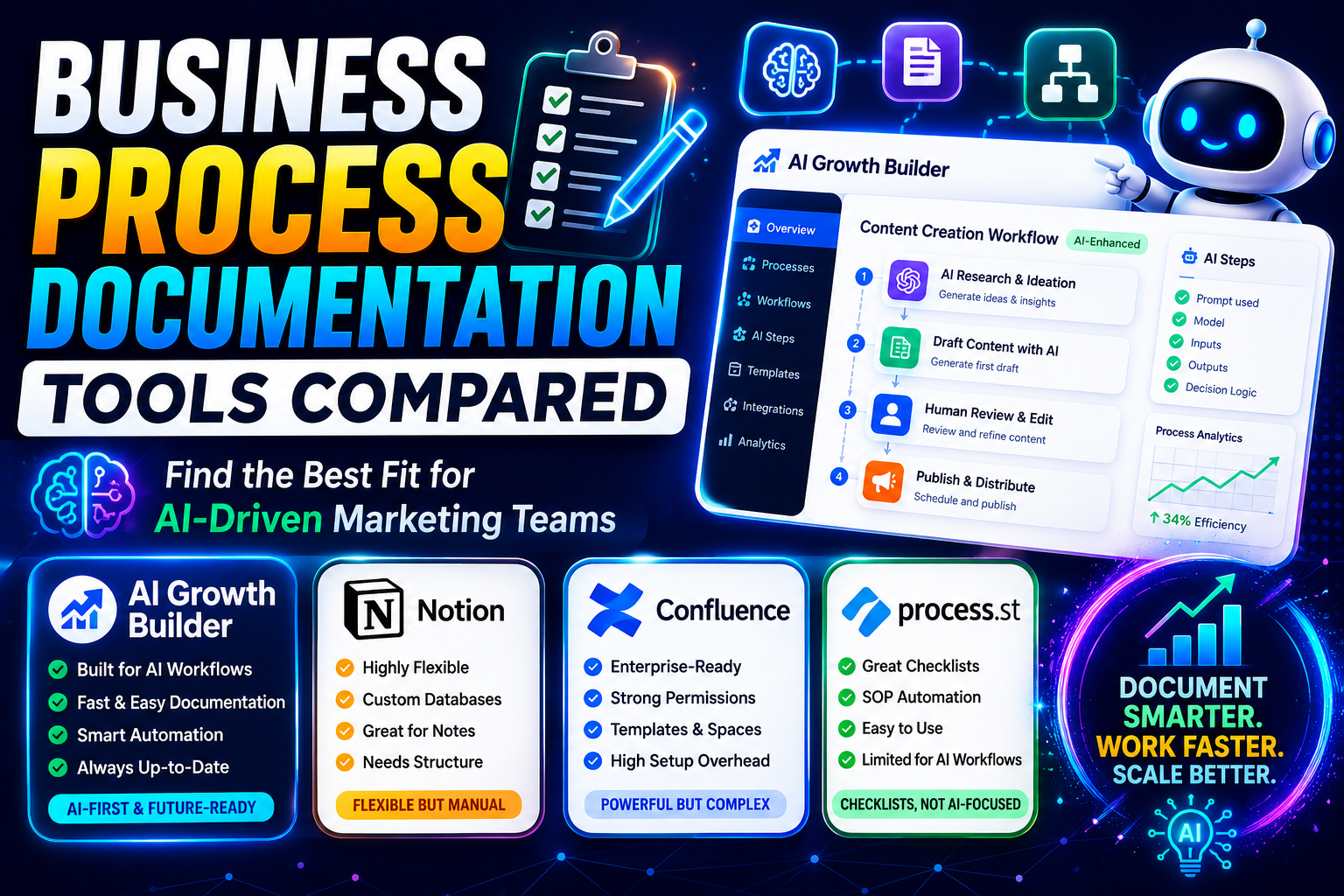
Traditional documentation platforms assume you have dedicated operations staff, a tolerance for rigid templates, and weeks to map processes before they change. For small business marketers who need to move fast, those assumptions break down. This comparison evaluates a newer entrant, AI Growth Builder, against three established documentation tools—Notion, Confluence, and Process.st—to help you decide which approach fits your stage, team size, and tolerance for maintenance overhead. For a deeper look at capturing dynamic workflows, see our guide on AI workflow documentation best practices.
Evaluation criteria for business process documentation tools
To make this comparison useful, we assess each tool across five dimensions that matter most to small marketing teams:
- Speed to first usable document. How quickly can a non-technical team member capture a process and have it ready for others to follow?
- Maintenance burden. How much ongoing effort is required to keep documentation accurate as workflows change?
- AI workflow integration. Does the tool support documenting AI-driven processes, or does it assume entirely human-operated steps?
- Team adoption friction. How easy is it to get everyone to actually use and update the documentation?
- Scalability for evolving processes. Does the tool accommodate processes that shift weekly, or does it lock you into a static version?
Side-by-side tradeoffs in business process documentation
Notion: Flexibility at the cost of structure
Notion is likely already in your stack. Its strength is near-limitless flexibility: you can build a documentation database, embed spreadsheets, link related pages, and publish internally with a few clicks. For a small team documenting a handful of marketing workflows, Notion works well—until it doesn’t.
The tradeoff becomes apparent as your business process documentation grows. Without strict governance, pages multiply, links break, and team members start keeping their own private notes. That flexibility also makes Notion a poor fit for documenting AI-driven workflows. You can embed a chatbot or a script reference, but the platform offers no native support for capturing automated decision trees or variable inputs that change across campaigns. You end up writing around the tool rather than through it.
Best for: Teams with a documentation champion willing to enforce structure and comfortable using the platform’s database features.
Not ideal for: Teams that need to document conditional logic, AI prompts, or branching workflows without manual upkeep.
Confluence: Designed for larger teams, less for velocity
Confluence brings real hierarchy, permissions, and template governance. For a growing organisation migrating from scattered Google Docs, it provides a central source of truth that scales across departments. Atlassian’s ecosystem integrates with Jira, which helps if your marketing workflows tie into project tickets.
But Confluence’s overhead is significant for a small team. Setting up spaces, managing permissions, and maintaining page trees takes time that a three-person marketing squad likely does not have. The tool also assumes processes remain relatively stable—you create a page, review it quarterly, and update as needed. That model struggles when you refine an AI prompt weekly or rotate between multiple automation tools across campaigns. Confluence treats business process documentation as a finished artefact; modern marketing documentation is more like a living reference that evolves with your stack.
Best for: Teams of ten or more with a designated operations role or a mandate to align marketing documentation with engineering or product workflows.
Not ideal for: Small, fast-moving teams that update processes frequently and cannot afford a documentation administrator.
Process.st: Strong on checklists, narrow on AI workflows
Process.st focuses on turning processes into repeatable checklists and standard operating procedures. Its interface guides users step by step, which reduces onboarding friction and ensures consistency. For documenting manual marketing processes—like content proofreading workflows or social media approval chains—it performs well.
The limitation surfaces when processes involve AI components. If your workflow relies on a custom GPT prompt, an API call, or a decision based on model output, Process.st offers limited ways to capture the variability. You can embed instructions, but the tool cannot model conditional branches tied to AI results. Teams that document hybrid processes—human review plus AI generation—end up abstracting away the AI steps or maintaining separate notes outside the platform.
Best for: Teams with stable, human-driven processes that benefit from strict checklist enforcement.
Not ideal for: Teams documenting AI-dependent workflows, variable prompt chains, or processes with frequent conditional branches.
AI Growth Builder: Built for AI-driven workflow documentation
AI Growth Builder enters the space with a specific assumption: your processes increasingly involve AI tools, prompt sequences, and automated decision points, and your business process documentation should reflect that reality without adding manual overhead. Rather than treating a process as a static document, it enables teams to capture workflows that include AI inputs, output variants, and conditional logic as first-class elements.
The platform’s emphasis is on speed to first useful document. Teams can describe a process in natural language and have it structured into a repeatable workflow, including steps where AI handles part of the task and human review handles another. That matters when you are iterating on a lead scoring model or refining a content generation pipeline every few days.
The tradeoff is scope. AI Growth Builder is narrower than Notion or Confluence. It does not replace your knowledge base or your project management tool. It focuses specifically on process capture and maintenance for AI-augmented teams. If your marketing operations are entirely manual with no AI tools in the stack, the platform’s specific strengths may not justify a separate tool.
Best for: Small teams running AI-assisted campaigns, prompt-based content pipelines, or automated outreach sequences that need repeatable, updatable documentation.
Not ideal for: Teams with no AI in their workflows, or teams that need a general-purpose documentation hub rather than process-specific capture.
Best-fit guidance by team profile for business process documentation
You are a solo marketer or two-person team using AI tools
You likely already rely on AI for drafting, research, or data analysis, and you need documentation that keeps up with your experiments. AI Growth Builder fits here because it reduces the friction of capturing a process you change often. Notion could work if you have the discipline to maintain it, but the maintenance burden tends to push solo operators back to ad-hoc notes.
You are a growing team of five to eight with mixed manual and AI workflows
This is where the decision gets harder. If your marketing processes are roughly 70 percent manual and 30 percent AI-assisted, Process.st or Notion with disciplined templates can serve you well. But if the ratio is reversed—most of your workflows involve AI generation, prompt tuning, or automated routing—AI Growth Builder reduces the documentation drag that otherwise slows iteration.
You are a team of ten or more with dedicated ops support
Confluence remains the strongest option when you have someone responsible for documentation hygiene. Its hierarchy and permissions suit larger teams. However, if your team runs multiple AI-driven campaigns simultaneously, consider using AI Growth Builder alongside Confluence for the process layer, while keeping Confluence as the broader knowledge repository.
Decision factors to weigh for business process documentation
Beyond tool features, three factors should drive your choice:
How often do your processes change? If your content pipeline, outreach sequence, or lead scoring method shifts every few weeks, pick a tool that treats documentation as iterative rather than final. AI Growth Builder and Notion (with discipline) handle iteration. Confluence and Process.st assume more stability.
What is your team’s tolerance for documentation overhead? Every minute spent updating documentation is a minute not spent on revenue work. Tools that require manual restructuring, page reorganisation, or template maintenance create hidden costs. The more AI-driven your workflows, the more likely that overhead will cause documentation to fall out of date.
Do you need to document conditional and branching logic? Marketing workflows that involve AI often include “if this model output, then do X; if not, do Y.” Most documentation tools cannot represent that logic cleanly without workarounds. If your processes include these branches, prioritise tools that support them natively.
Final recommendation by use case
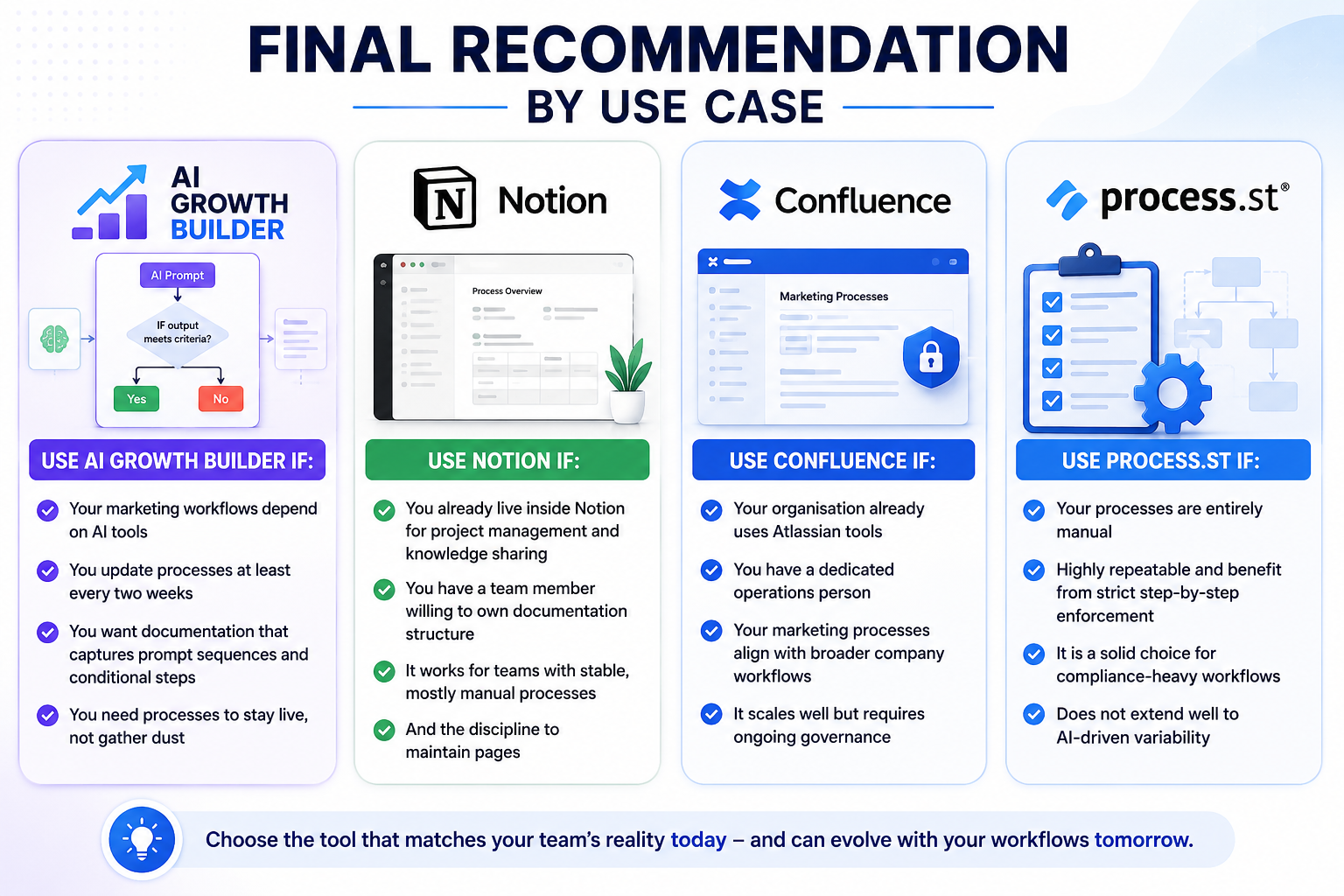
Use AI Growth Builder if: Your marketing workflows depend on AI tools, you update processes at least every two weeks, and you want business process documentation that captures prompt sequences and conditional steps without extra manual work. It is the most efficient choice for teams that run AI-assisted campaigns and need process documentation to stay live rather than gather dust.
Use Notion if: You already live inside Notion for project management and knowledge sharing, and you have a team member willing to own documentation structure. It works for teams with stable, mostly manual processes and the discipline to maintain pages.
Use Confluence if: Your organisation already uses Atlassian tools, you have a dedicated operations person, and your marketing processes align with broader company workflows. It scales well but requires ongoing governance.
Use Process.st if: Your processes are entirely manual, highly repeatable, and benefit from strict step-by-step enforcement. It is a solid choice for compliance-heavy workflows but does not extend well to AI-driven variability.
Practical next steps for business process documentation
Business process documentation is not a set-and-forget project. The tool you choose should reflect how often your workflows change and how much AI shapes them. Before committing, document three of your most frequently used marketing processes manually—one entirely human, one with light AI assistance, and one heavily AI-driven. Map each one against the tools above. That exercise will reveal which platform reduces friction and which one adds overhead for your specific mix.
Start with one process, not ten. Capture it, run it twice, update it once, and measure how much effort the update required. The tool that keeps that effort low while keeping the process accurate is the one worth adopting. For additional insights on selecting the right documentation approach, explore our marketing workflow automation guide.
Keep Reading